
Platform / Test Automation / Enterprise Applications / Guidewire
Guidewire test automation from the test cases your underwriters and adjusters already wrote.
PolicyCenter, ClaimCenter, and BillingCenter are among the hardest interfaces in enterprise software to automate: wizard-driven screens, nested frames, configuration that differs at every carrier, and cloud releases arriving roughly every four months. Spec2RunAI, the test executor inside Spec2TestAI, runs the manual test cases your business already has against Guidewire as written — no object library, no scripting, no conversion project — and ends every run with an evidence report a business owner can sign. We tuned it against a live PolicyCenter environment provided by a Guidewire implementation partner.
Four reasons Guidewire suites cost more to keep than to build.
Wizards, frames, and generated markup
A PolicyCenter submission walks through a multi-step wizard with panels, list views, modal pickers, and date and currency fields whose element IDs are generated, not authored. ClaimCenter’s FNOL and exposure screens nest just as deeply. Locator-bound scripts bind to markup nobody at the carrier controls.
Releases every few months, on Guidewire’s calendar
Guidewire Cloud ships named releases a few months apart — Las Leñas in December 2024, Mammoth the following April — and has announced a cadence of three a year. Each one is a regression cycle for every carrier on the platform, whether or not the test suite is ready for it.
Every implementation is different
Product model, rating, underwriting rules, page configuration, and integrations are all carrier-specific. A vendor-supplied test pack covers the standard screens; the risk sits in the ones your implementation partner configured. Those tests have to come from people who know your book of business.
The people who know the answer cannot write the script
Whether a quote rated correctly, a reserve posted to the right coverage, or a delinquency triggered on schedule is a judgment for underwriters, adjusters, and billing analysts. When automation requires an engineer to translate their test case into a framework, the translation step becomes the bottleneck and the evidence loses its author.
The journeys that matter, across InsuranceSuite.
Written the way your testers already write them. The executor resolves each step against the live screen, so a change to a panel, a label, or a wizard step is absorbed rather than repaired.
PolicyCenter
New submission through quote, underwriting review, and bind; policy change, renewal, cancellation, and reinstatement; account and contact management; rating checks against expected premium.
ClaimCenter
First notice of loss through exposure creation, reserving, assignment, and payment; recovery and subrogation; claim notes, documents, and activities; authority and approval routing.
BillingCenter
Account and policy billing setup, invoice generation, payment plans, direct and agency bill, delinquency and cancellation workflows, commissions, and disbursements.
Portals and integrations
Agent and policyholder journeys on your digital front end that land in InsuranceSuite, and the cross-system checks — a policy that must appear in billing, a payment that must appear on the claim — that single-application tests cannot see. Carriers running Insurity alongside Guidewire get one executor and one evidence format.
Running Guidewire Cloud? Public environments run from our cloud executor. Self-managed or on-premise InsuranceSuite runs through the local agent — the same executor installed inside your network, outbound HTTPS only. How a run executes →
Tuned against a live PolicyCenter environment, not a screenshot.
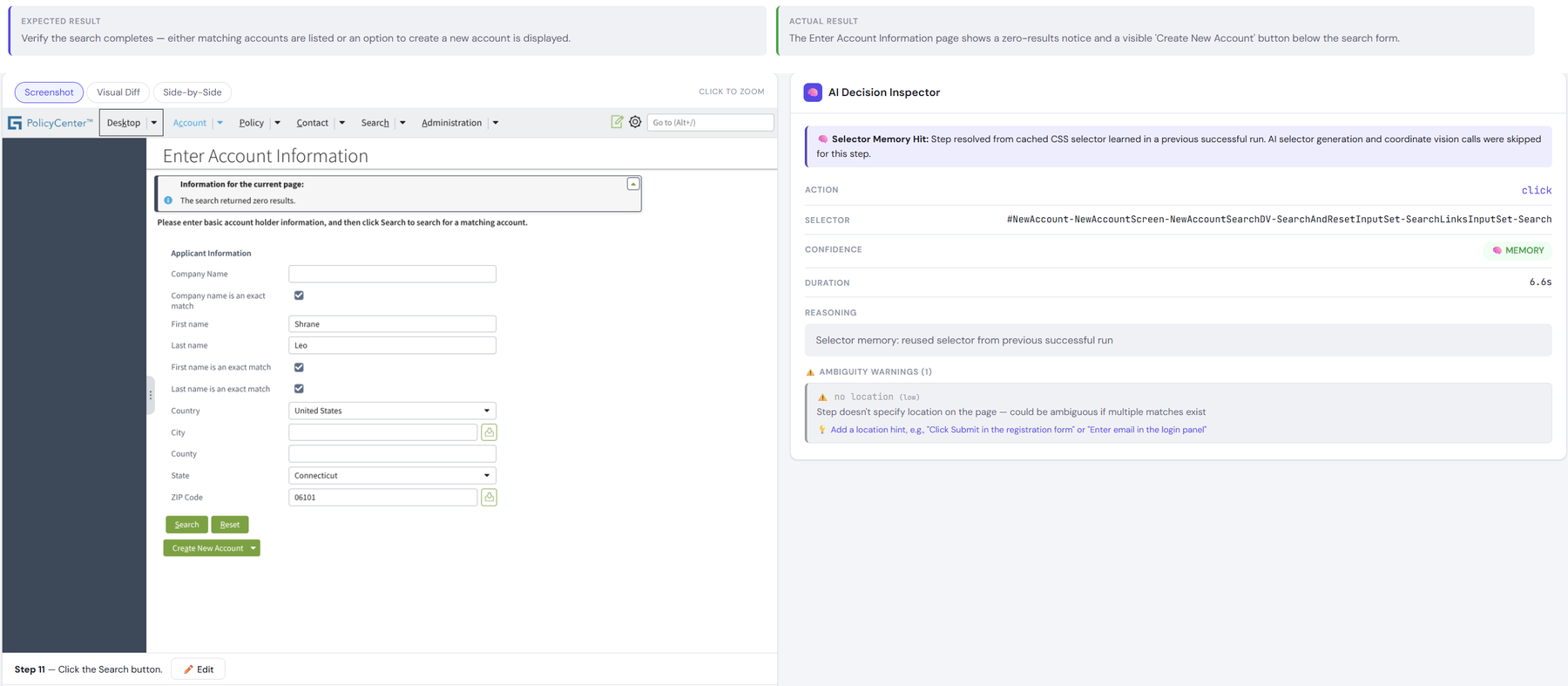
A Guidewire implementation partner gave us a working PolicyCenter sandbox. We ran real test cases through it and tuned the executor until the control patterns PolicyCenter shares with the rest of InsuranceSuite — list views, detail panels, wizard navigation, modal pickers, typeahead fields, date and currency inputs — resolved reliably from the plain-English step alone.
No object library to build or buy
There is no Guidewire pack, no element map, and no specialist role to staff. The executor reads the screen the way an adjuster does and acts on what it sees. Custom pages your partner configured are handled the same way as standard ones.
Proven steps replay deterministically
The first run interprets each step against the live screen. Afterward, selector memory replays proven steps in about two seconds without a model call, re-validated against the step’s intent before each action — which is what keeps a 500-case regression affordable three times a year.
Healing that cannot move the goalposts
Autonomous Tuning rewrites how a failed step runs against the live screen, never what it verifies. Assertion Lock keeps the expected premium, the reserve amount, and the invoice total exactly as the tester wrote them, and the report proves it.
Evidence a business owner can sign
Every run ends in a Run Evidence Report: verification coverage per step, failures classified as application defect, test defect, environment, or data, comparison with the previous run, an AI provenance appendix, and a PDF with signature lines for QA review and business sign-off.
Three ways to automate Guidewire, described plainly.
Where the first two are right, we say so: a partner framework your team maintains comfortably has no migration risk, and accelerator packs reach batch processes and integration layers that a UI executor does not. Our three-year cost model shows the crossover in your own numbers, including the case where an in-house team wins.
What insurance QA teams ask us first.
Does Spec2RunAI work with Guidewire Cloud and with self-managed InsuranceSuite?
Both. Guidewire Cloud environments reachable from the internet run from our cloud executor, one isolated agent per test case. Self-managed or on-premise PolicyCenter, ClaimCenter, and BillingCenter run through the local agent, the same executor installed inside your network with outbound HTTPS only — no inbound ports, no VPN. Most carriers use both.
Do we need a Guidewire plugin, accelerator, or object library?
No. The executor was tuned against a live PolicyCenter sandbox provided by a Guidewire implementation partner so that the control patterns InsuranceSuite uses — wizards, list views, panels, pickers, typeahead and date fields — resolve from the plain-English step. There is nothing to install in Guidewire and no element map to maintain when your partner configures a new page.
How does it handle PolicyCenter’s submission wizard and ClaimCenter’s nested screens?
Step by step, the way a tester does: it reads the current screen, resolves the control the step refers to, acts, and verifies the expected result before moving on. Wizard navigation, panel changes, and modal pickers are ordinary steps. Compound instructions such as “add a driver and set the vehicle to pleasure use” are decomposed into atomic actions automatically.
What happens when Guidewire ships a release?
Run the suite in your pre-production environment during the release window. Steps re-resolve against the new screens; where a label or layout changed, Autonomous Tuning rewrites how the step runs and the evidence report records the rewrite beside the original wording, with the expected result unchanged. Failures arrive classified, so a real regression in your rating or reserving rules is separated from a cosmetic change before anyone opens the application.
Can our underwriters, adjusters, and BAs write and run the tests?
Yes. That is the point. The test cases they already wrote for UAT — in Jira, Zephyr, qTest, Excel, or Word — run as written, and new ones are written the same way. No syntax to learn and no engineering queue between the person who knows the business rule and the result.
What about test data: policies, claims, accounts?
Tests reference data the way testers do — a policy number, an insured name, a claim in a given state — and the platform can provision synthetic test data through GenRocket Data Connect where production-like records are needed without production data. Data-caused failures are classified as such in the report, separately from application defects.
Bring us a submission, a claim, and an invoice.
Send ten of your existing Guidewire UAT test cases, untouched. We will run them against your sandbox and hand you the evidence report.